Open Forum

 View Only

 Adding a schedule check in queue

Dawn Guthrie's profile image
Dawn Guthrie 8x8 User posted 10-10-2023 02:13

I'm looking to see how people handle in queue calls when they have an issue with VCC?

Currently we activate a schedule when we have initial issues, to stop any more customers joining the queue, and advise them our system is down. This leaves some customers in queue, unless they choose to hang up.

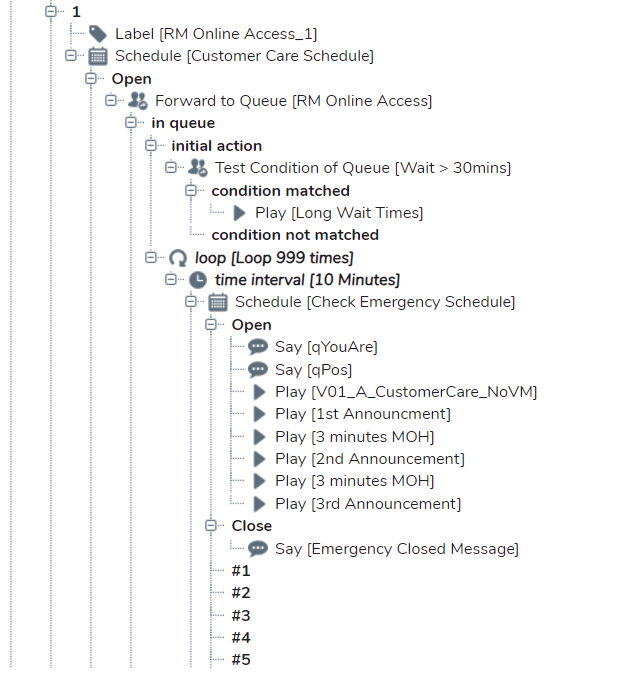
I've tested adding a schedule mid queue and when a "special event" is added it plays the required msg when it reaches that point in the loop and exits the customer from queue, but I can't find any support information that states this is a proper use of a schedule. I don't want to add this to all our queues and then realise it causes some other problem down the line.

Ben Fischer's profile image
Ben Fischer 8x8 User

edit: I note you have done this, based on all available information I would do the same. We have the Emergency Schedule checked at the top of the IVR, so it's just doing an additional check of this schedule during the loop. I am redoing our IVRs at the moment.

You could do something like this

Transfer to Q

Loop every 10 mins, check the emergency schedule and provide feedback the company is experiencing unforeseen issues, or continue on hold music. This way the customer will only be stuck in the IVR for a max of 10mins.